
The simplest way to connect Futuri VoiceAI™ to your station is with Universal Automation Integration. Follow the quick and easy steps below to set it up:
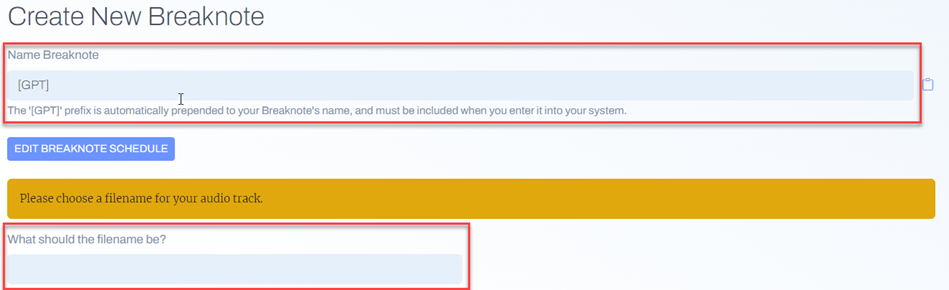
- In your Futuri VoiceAI™ admin, navigate to the Breaknotes tab and click to create a new Breaknote.
- After giving the Breaknote a title, you will be prompted to name the associated audio file.
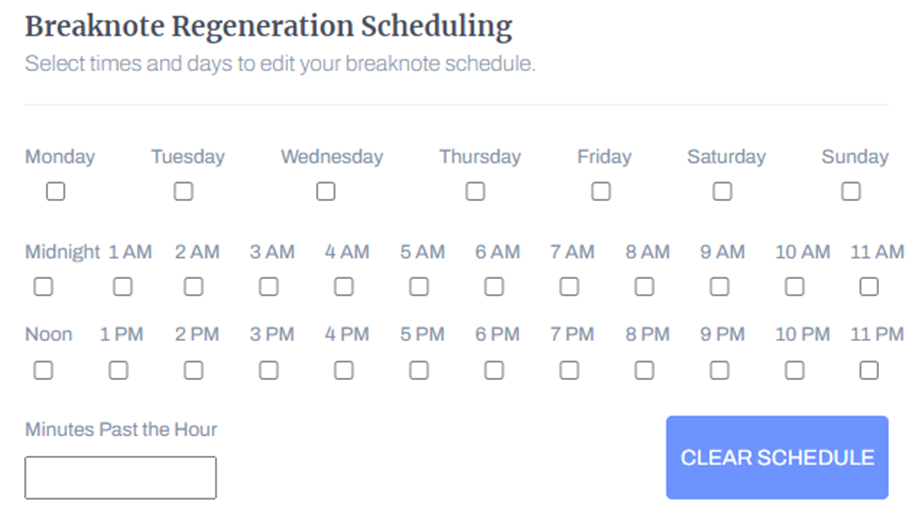
- Next, click the blue button to "Edit Breaknote Schedule". Here you can select when your Breaknote will regenerate with fresh content. Check the boxes to select the day(s) and hours(s) to regenerate, and then use the field at the bottom to set the Minutes Past the Hour. TIP: Make sure to regenerate your Breaknote at least 15 minutes before the scheduled air time to ensure it is updated in time.
- You can now finish creating the rest of the Breaknote.
- Copy the URL displayed in the blue box and add it to your automation schedule/clock, enabling it to play audio from the internet. For assistance with this step, please contact your automation system support team.

The file accessed at that URL will be updated with new content per your schedule.
And that's it! You are now connected and ready to go live with AI on your radio station.